Jeopardy-style quiz boards
Categories, clues, accepted answers and point values.
Shared OGG account for your saved games; follow the product’s sign-in instructions.
Continue to Quiz Champ creation entry ↗CREATE · PREPARE · HOST
Pick a format, see how a round works, and open its creator. Customize questions or words on that game’s site, rehearse, then host your group.
This is a creator-selection gateway. Choose the content you have; the link opens that product’s own setup, with sign-in or access checks where required.
Categories, clues, accepted answers and point values.
Shared OGG account for your saved games; follow the product’s sign-in instructions.
Continue to Quiz Champ creation entry ↗Matching prompts, accepted answers and explicitly illustrative points unless sourced survey data exists.
Separate Family Feud login; explicitly connect your OGG account for Game Pass access.
Continue to Family Feud creation entry ↗Puzzle answers, categories and clues; check spelling.
Creator entry may require the shared OGG login. The homepage offers a sample spinner.
Continue to Fortunate Wheel creation entry ↗A question, accepted number/answer and units. Real prices need a dated source and currency.
Shared OGG account; check access before using a paid template. Sample values are practice examples.
Continue to Right Price creation entry ↗Secret words and, for a prepared-clue mode, matching clues.
Sign in to create/save. Public sample needs no account in the observed flow.
Continue to PlayPassword creation entry ↗Category questions, correct options and teaching/host explanations.
Shared OGG account. Creator and signed-in sample verified; rehearse with your current access before the event.
Continue to Are You Smarter creation entry ↗Multiple-choice questions, accepted answers and a virtual reward path.
Shared OGG sign-in; the manual quiz-ladder editor was verified with an active QA account. Check current access on that site.
Continue to Millionaire creation entry ↗One real creation rehearsal, in three screens. These are screenshots of Quiz Champ, captured November 5, 2026.
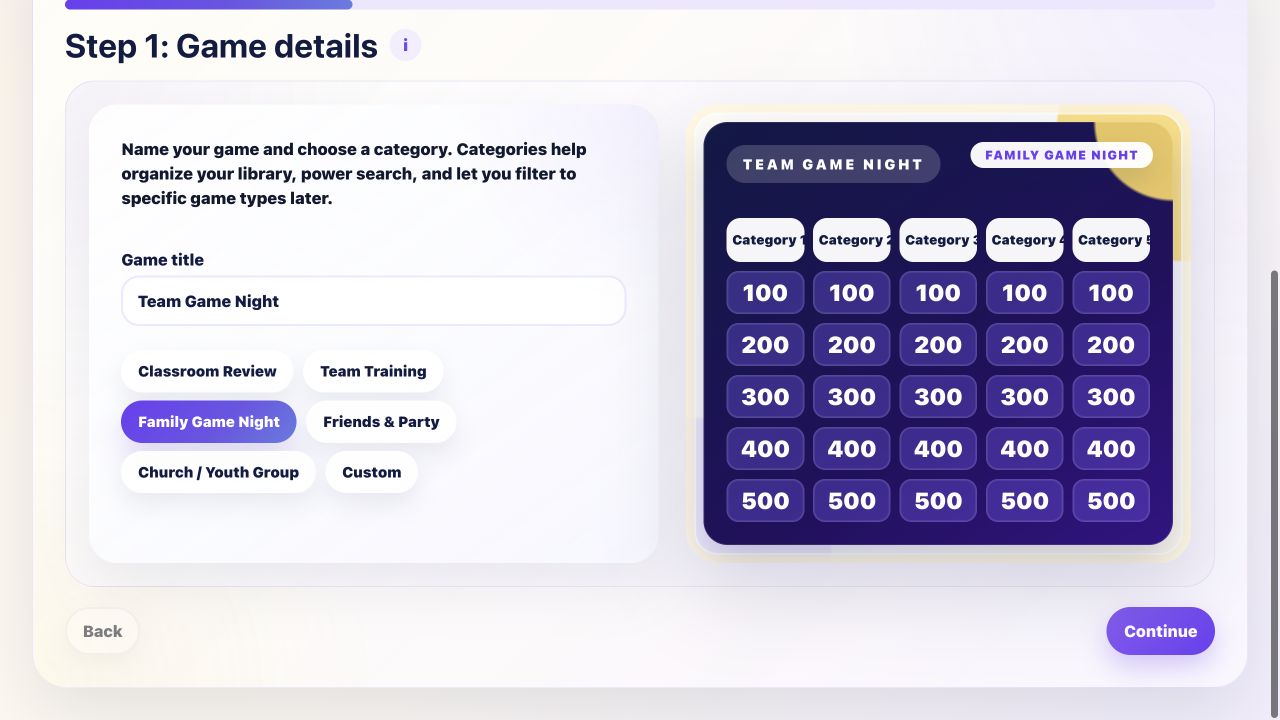
Choose a game type in Quiz Champ. This example starts as Team Game Night, with a category-board preview.
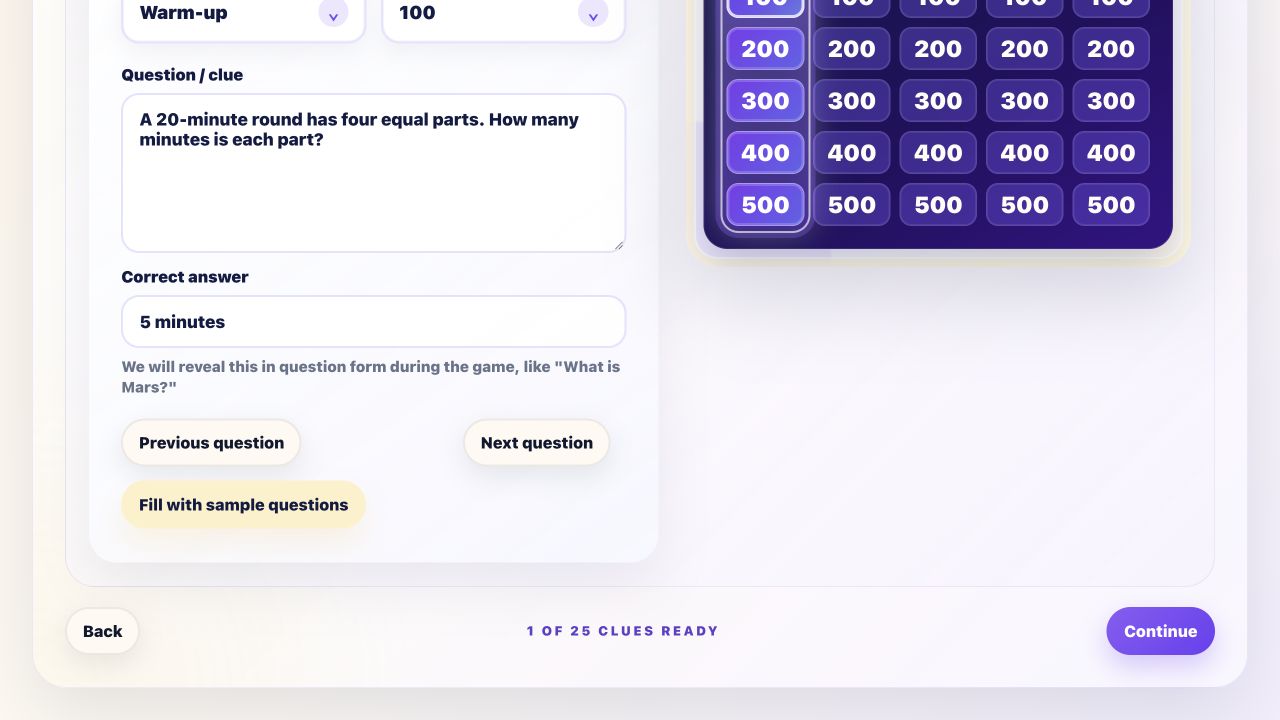
Name your categories, choose a point value and enter a checked question and answer. Our example uses a simple timing question.
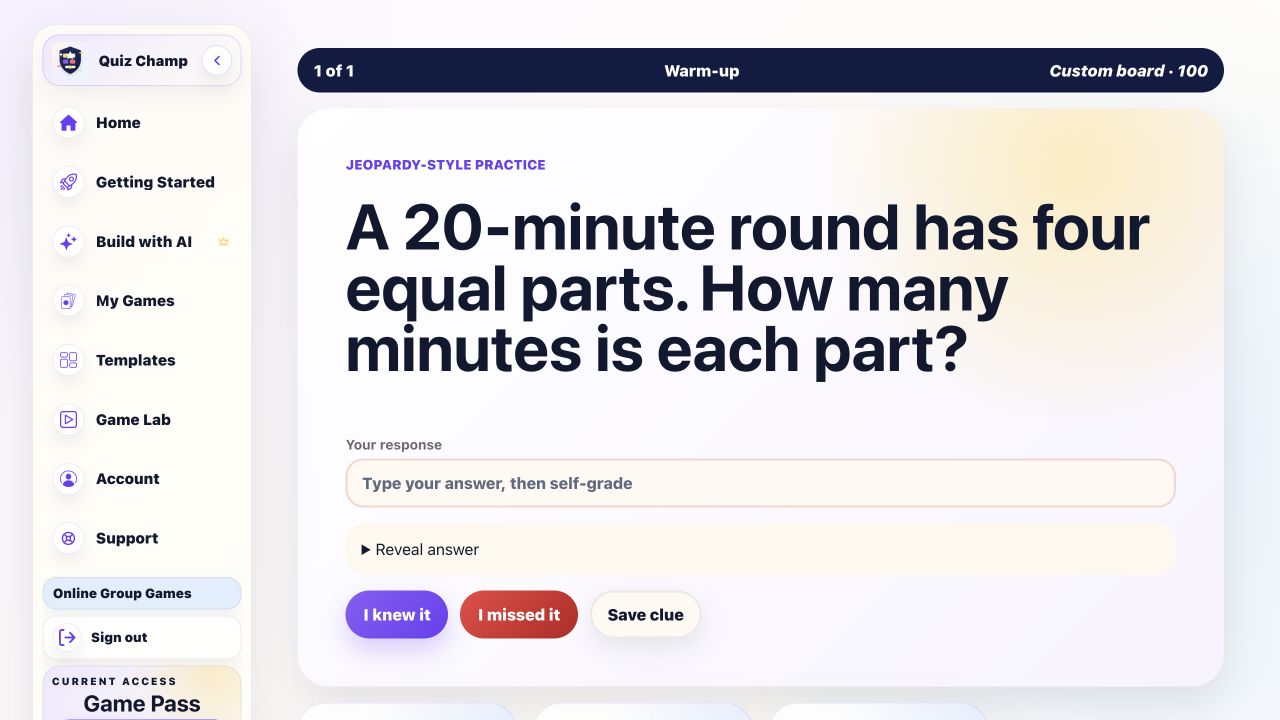
Open Practice Mode to rehearse your clue. Review the answer and screen setup before using the separate live-hosting flow.
Start with a few questions, practice your answers, then follow Quiz Champ’s save and hosting instructions. Your game stays on Quiz Champ.
The captured example demonstrates setup, clue editing and Practice Mode. Use the product’s separate live-host setup after your rehearsal; a practice screen is not a live-room test.
Use your shared OGG account for the six native products. Included in monthly and lifetime Game Pass. Connect your separate Family Feud account; your saved games and independent purchases stay intact. Game features and access checks stay on each product’s website.
Jeopardy-style quiz boards
Open Quiz Champ creation entry ↗ (on its own website, in a new tab)
Survey-style answer board
Open Family Feud creation entry ↗ (on its own website, in a new tab)
No public playable sample verified in this pass; an editor preview is not a live room.
Wheel of Fortune-style word puzzles
Open Fortunate Wheel creation entry ↗ (on its own website, in a new tab)
The Price Is Right-style price-guessing games
Open Right Price creation entry ↗ (on its own website, in a new tab)
No public playable sample verified in this pass; an editor preview is not a live room.
Password-style word and clue games
Open PlayPassword creation entry ↗ (on its own website, in a new tab)
Are You Smarter Than a 5th Grader-style quizzes
Open Are You Smarter creation entry ↗ (on its own website, in a new tab)
Who Wants to Be a Millionaire-style quizzes
Open Millionaire creation entry ↗ (on its own website, in a new tab)
Still comparing mechanics? Use the format collection before choosing a creator.
No. These links route to separate product creators. This page does not collect questions or create a live game.
The observed Quiz Champ workflow accepts your title, categories, question and accepted answer. Other products have different content inputs, listed above.
The public Quiz Champ sample and PlayPassword sample were playable without a purchase in the observed flows. Creation and saving follow the selected product’s current account and plan requirements.
SEVEN GAMES · CONNECT FAMILY FEUD
Game Pass provides premium access to seven participating games for $29/month or $149 once for lifetime access. Each game has its own features and hosting limits.
Included in monthly and lifetime Game Pass. Connect your separate Family Feud account; your saved games and independent purchases stay intact.